
Introduction
SEO Migration Website Checklist TheAlite is the process of making major changes to a website—such as redesigning, moving to a new domain, switching CMS platforms, or implementing HTTPS—while preserving its search engine rankings and organic traffic. Without careful planning, website migrations can lead to broken links, ranking drops, and lost visibility. Following a structured SEO Migration Website Checklist TheAlite approach ensures that your website transitions smoothly, maintaining its authority and performance in search results.
Why You Need an SEO Migration Website Checklist Thealite
You May Also Like It:
Guest Posting Service Grow Your Website Authority
Write Guest Post Boost Your Website Authority
SEO Migration Service by Thealite Boost Your Rankings
Migrating a website without a proper plan can be risky, especially for SEO. A well structured SEO migration website checklist Thealite helps you manage the process efficiently and ensures your website maintains its search engine visibility. With a checklist, you can prevent ranking drops, avoid broken links, and make sure all technical SEO elements—like meta tags, sitemaps, and redirects—are correctly handled. Using a checklist also helps streamline communication between teams, minimizes errors, and provides a clear roadmap for each step of the migration. Whether you’re redesigning your website, moving to a new CMS, or changing domains, this checklist acts as a safety net, ensuring that your organic traffic remains stable and your website continues to perform well in search results.
Pre Migration Planning Steps
Proper planning is the foundation of a successful website migration. Pre-migration preparation ensures that your SEO value is preserved and potential issues are identified before they impact your rankings. Follow these key steps:
Benchmark Current SEO Performance
- Before making any changes, record your website’s current traffic, keyword rankings, and conversions. This gives you a baseline to measure the success of your migration and helps identify any drop in performance after the move.
Backup Your Website
- Always create a full backup of your website files, databases, and content. In case anything goes wrong during the migration, you can restore your website to its previous state without losing critical data.
Crawl Your Existing Website
- Use tools like Screaming Frog or Sitebulb to crawl your current site. This identifies all existing URLs, meta tags, internal links, and other SEO elements that need to be preserved or updated in the new website.
Create a Detailed Migration Plan
- Draft a comprehensive plan that outlines each step of the migration, timelines, team responsibilities, and tools required. A detailed plan ensures that everyone involved knows their role and reduces the risk of errors during the process.
URL Mapping and Redirect Strategy
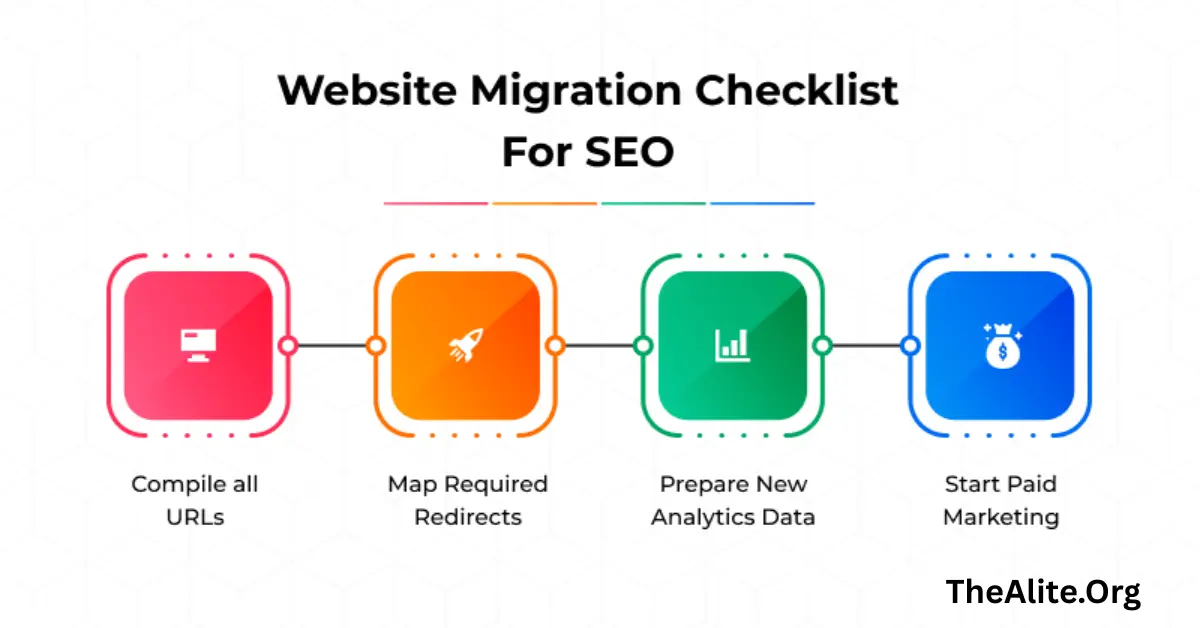
One of the most critical parts of SEO migration is ensuring that all URLs on your old website are properly mapped and redirected to the new website. Failing to do so can result in broken links, 404 errors, and a significant drop in search rankings.
How to List Old URLs
- Start by creating a complete list of all URLs on your current website. Tools like Screaming Frog or Google Search Console can help you extract every page, including blog posts, product pages, and landing pages.
Mapping Old URLs to New URLs
- Once you have a list, map each old URL to its corresponding new URL. This step ensures that every page has a proper destination and that no content is lost during the migration.
Implementing 301 Redirects
- Set up 301 redirects from old URLs to the new URLs. A 301 redirect tells search engines that a page has permanently moved, passing on its SEO value to the new page. Avoid using 302 redirects as they do not transfer full SEO authority.
Testing Redirects
- After implementing redirects, test them thoroughly to ensure they work correctly. Tools like Screaming Frog, Ahrefs, or Redirect Checker can verify that all redirects are functioning and there are no chains or loops.
Preserving On Page SEO Elements
During a website migration, it’s crucial to maintain all on-page SEO elements to ensure that your rankings and organic traffic remain intact. This involves transferring and optimizing all key content and metadata.
Transfer Meta Titles and Descriptions
- Ensure that all meta titles and descriptions from the old website are correctly transferred to the new site. These elements are essential for search engines to understand your page content and for attracting clicks in search results.
Maintain Header Tags and Internal Links
- Preserve your existing header structure (H1, H2, H3) as much as possible. Also, make sure internal links are updated to point to the correct new URLs to maintain link equity and help search engines crawl your website efficiently.
Optimize Content for Keywords
- Check that your target keywords remain properly integrated into your content. If you’re updating pages during migration, ensure keyword optimization follows SEO best practices to enhance search visibility.
Image SEO and Alt Tags
- Don’t forget images. Transfer all images to the new website and ensure alt tags are preserved or updated. This improves accessibility and helps search engines understand your visual content.
Technical SEO Setup for Migration
Technical SEO is critical to ensure that search engines can crawl, index, and rank your new website effectively. During migration, paying attention to technical details can prevent ranking drops and maintain website performance.
Update Robots.txt and XML Sitemap
- Review and update your robots.txt file to ensure no important pages are blocked from search engines. Generate a fresh XML sitemap reflecting your new website structure and submit it to Google Search Console and Bing Webmaster Tools.
Ensure HTTPS and Secure Protocols
- If you’re switching to HTTPS or maintaining it, make sure SSL certificates are correctly implemented. HTTPS not only secures your website but is also a ranking factor for search engines.
Optimize Site Speed and Mobile-Friendliness
- Website speed and mobile usability are crucial for SEO. Test page load times and ensure responsive design so your website performs well across all devices. Tools like Google PageSpeed Insights can help identify improvements.
Implement Canonical Tags
- Use canonical tags on pages with similar or duplicate content to tell search engines which version to index. This prevents duplicate content issues and consolidates SEO value.
You May Also Like It:
Advanced Technical SEO in Australia Thealite Tips
High DA Guest Post Boost SEO with Quality Backlinks
Social Media Service Thealite Grow Your Brand Online
Post Migration Testing and Verification
After your website migration, thorough testing and verification are essential to ensure everything is working correctly and that your SEO value is preserved. This step helps identify issues before they affect user experience or search rankings.
Crawl New Website for Errors
- Use tools like Screaming Frog or Sitebulb to crawl the new website and identify issues such as broken links, missing meta tags, or duplicate content. Crawling helps ensure all pages are accessible to search engines.
Check Redirects and Broken Links
- Verify that all 301 redirects are functioning correctly and that there are no redirect chains or loops. Fix any broken links to maintain SEO value and provide a seamless user experience.
Verify Analytics and Tracking Codes
- Ensure that Google Analytics, Google Tag Manager, and any other tracking codes are properly installed on the new website. This allows you to monitor traffic, conversions, and other key metrics immediately after migration.
Submit Updated Website to Search Engines
Once your website migration is complete, it’s important to notify search engines so they can crawl and index your new pages efficiently. Proper submission ensures your site maintains visibility and rankings.
Submit Sitemap to Google Search Console
- Upload your updated XML sitemap to Google Search Console. This helps Google discover your new URLs quickly and understand the structure of your website.
Request Indexing for Key Pages
- Manually request indexing for important pages using Google Search Console. This speeds up the process of getting your new pages crawled and listed in search results.
Monitor Crawl Errors
- Keep an eye on crawl errors and fix them promptly. Google Search Console provides reports on 404 errors, server issues, and other problems that could affect your site’s visibility.
Monitoring and Continuous Optimization

After your website migration, continuous monitoring and optimization are essential to ensure long-term SEO success. Tracking performance helps you quickly address any issues and capitalize on opportunities to improve visibility.
Track Rankings and Organic Traffic
- Monitor your keyword rankings and organic traffic closely. Compare these metrics with your pre-migration benchmarks to identify any drops or improvements and take corrective actions if needed.
Fix Issues Quickly After Migration
- Address any 404 errors, broken links, or redirect issues as soon as they appear. Prompt fixes prevent negative impacts on SEO and maintain a positive user experience.
Update Backlinks to New URLs
- Reach out to websites linking to your old URLs and request updates to the new URLs. This ensures that your backlink equity is preserved and continues to support your SEO performance.
Common SEO Migration Mistakes to Avoid
Even with careful planning, some common mistakes during SEO migration can lead to ranking drops and traffic loss. Being aware of these pitfalls helps you prevent them and ensures a smooth transition.
Skipping 301 Redirects
- One of the biggest mistakes is failing to implement 301 redirects from old URLs to new ones. Without proper redirects, visitors and search engines may land on 404 pages, causing a loss of SEO value and traffic.
Ignoring Internal Links and Site Structure
- Not updating internal links or neglecting site structure can lead to broken links, poor crawlability, and lost link equity. Ensure all internal links point to the correct new URLs.
Overlooking Mobile Optimization
- Migrating a website without testing mobile-friendliness can harm your SEO, as Google prioritizes mobile-first indexing. Ensure your new site is fully responsive and works seamlessly on all devices.
Launching Without Testing
- Skipping post migration testing can lead to undetected errors such as broken redirects, missing meta tags, or indexing issues. Always test thoroughly before and after the migration.
FAQs About SEO Migration Website Checklist Thealite
What is SEO migration?
SEO migration is the process of making major changes to a website, such as redesign, domain change, or CMS switch, while preserving its search engine rankings and traffic.
Why is a migration checklist important?
A checklist ensures that all steps—like redirects, technical SEO, and content preservation—are completed, reducing the risk of ranking drops and broken links.
How do I preserve my website’s SEO during migration?
Use 301 redirects, maintain meta titles and descriptions, preserve internal linking, and ensure technical SEO elements are intact to protect rankings.
What tools can help with SEO migration?
Tools like Screaming Frog, Google Search Console, Ahrefs, SEMrush, and Sitebulb help with URL mapping, crawling, tracking errors, and monitoring performance.
How do I test my website after migration?
Crawl your new website, check redirects, verify tracking codes, monitor for broken links, and compare pre- and post migration SEO performance.
How long does it take for search engines to index the new website?
It typically takes a few days to weeks, depending on website size and crawl frequency. Submitting sitemaps and requesting indexing can speed up the process.
Can migration affect my keyword rankings?
Yes, if redirects, on-page SEO, or technical SEO are not handled properly. Following a checklist helps minimize ranking fluctuations.
Should I update backlinks after migration?
Yes, updating backlinks to point to new URLs preserves link equity and strengthens your SEO performance.
Conclusion
Website migration is a complex process that requires careful planning, execution, and monitoring to protect your SEO performance. By following this SEO migration website checklist Thealite, you can preserve your rankings, maintain organic traffic, and improve the overall performance of your new website. From pre-migration planning and URL mapping to preserving on page SEO, setting up technical elements, and monitoring performance post launch, every step plays a crucial role in a successful migration. Avoid common mistakes like skipping redirects or neglecting mobile optimization, and always test thoroughly before and after the move. With a structured approach and continuous optimization, your website can transition smoothly, maintain its search engine visibility, and even achieve improved rankings in the long run.
You May Also Like It:
Content Writing Thealite High-Quality and SEO Friendly
Website Design Service Thealite Stunning and Responsive
Thealite Australia Expert Digital Services and Solutions
Luminary Digital Marketing Agency Review in Brisbane Thealite
