
Introduction
If your website isn’t performing as expected in search results, the problem may not be content—it could be hidden technical SEO issues. A technical SEO audit is a comprehensive evaluation of your website’s technical foundation to ensure search engines can crawl, index, and rank it effectively. Conducting a technical SEO audit allows you to identify hidden errors, improve site speed, enhance user experience, and increase organic traffic. This guide will show you how to conduct a technical SEO site audit step by step, providing actionable strategies and real-world examples. Whether you are a beginner or an experienced SEO professional, this guide equips you to create a search-engine-friendly website that both users and search engines love.
What is a Technical SEO Audit?
You May Also Like It:
Guest Posting Service Grow Your Website Authority
Write Guest Post Boost Your Website Authority
SEO Migration Service by Thealite Boost Your Rankings
A technical SEO audit is a systematic review of a website’s technical structure. Unlike content audits or backlink audits, it focuses on infrastructure, performance, and indexing issues that affect search engine rankings.
Importance of Technical SEO Audits
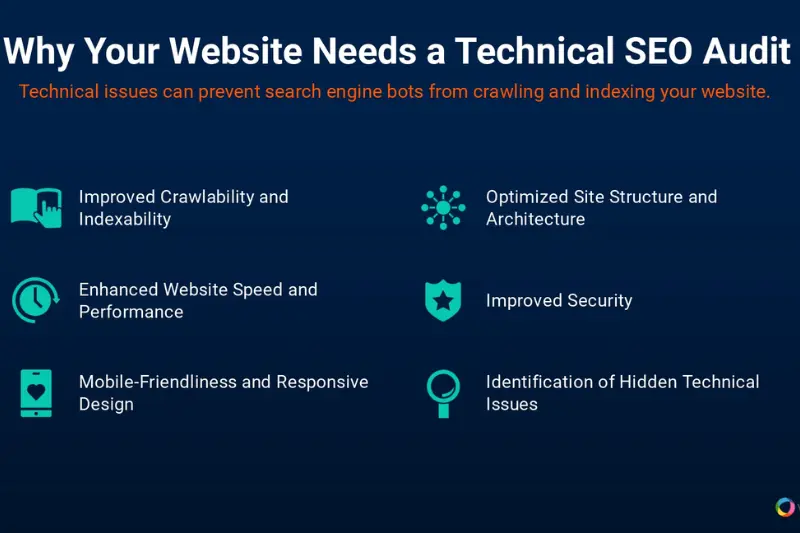
Search engines rely on bots to crawl websites. If your site has broken links, slow-loading pages, duplicate content, or poor structure, it may struggle to rank even with high-quality content. A technical SEO audit helps detect these issues and provides strategies to fix them.
Core elements of a technical SEO audit include:
- Site speed and performance
- Mobile-friendliness and responsive design
- Crawlability and indexing
- Site structure and hierarchy
- Security and HTTPS
- Structured data and schema markup
A technical SEO audit ensures your website has a strong foundation, giving your content the best chance to perform in search results.
Why Conduct a Technical SEO Audit
Regular technical SEO audits are critical. They help:
- Improve crawlability: Ensure search engines can access all important pages
- Enhance user experience: Fast, mobile-friendly sites retain visitors longer
- Boost search rankings: Fixing technical issues increases visibility
- Prevent penalties: Detect and resolve duplicate content, broken links, or security problems
Example: An online retailer discovered slow-loading pages and technical errors during a technical SEO audit. Fixing these issues resulted in a 30% increase in organic traffic within three months.
Steps to Conduct a Technical SEO Site Audit
You May Also Like It:
Advanced Technical SEO in Australia Thealite Tips
High DA Guest Post Boost SEO with Quality Backlinks
Social Media Service Thealite Grow Your Brand Online

Follow these step-by-step instructions for a successful technical SEO audit:
Step 1: Crawl Your Website
Crawling helps identify structural issues and errors, including:
- Broken pages
- Duplicate content
- Missing meta information
A complete crawl provides a full overview of your site’s technical health and highlights problem areas.
Step 2: Analyze Site Speed and Performance
Page speed is an essential ranking factor. Focus on:
- Slow-loading pages
- Heavy images or scripts
- Elements that block page rendering
Example: Optimizing scripts and compressing images reduced a site’s load time from 7 seconds to 3 seconds, increasing user engagement by 45%.
Step 3: Evaluate Mobile-Friendliness
With mobile-first indexing, mobile usability is crucial. Check for:
- Readable text without zooming
- Proper button and touch target sizes
- Responsive layout adapting to all screen sizes
Mobile-friendly websites keep users engaged and are favored by search engines.
Step 4: Inspect Indexing and Crawlability
Ensure all important pages are accessible and indexed. Check for:
- Crawl errors
- Pages blocked from search engines
- Missing pages from indexing
Proper indexing guarantees that your content is discoverable and improves search visibility.
Step 5: Review Site Structure and Navigation
A logical site structure benefits both users and search engines. Best practices include:
- Organizing content into categories and subcategories
- Ensuring pages are easily accessible from main navigation
- Maintaining consistency in naming conventions
- Keeping content hierarchy simple and intuitive
Example: A website with unorganized navigation improved user engagement and reduced bounce rates after reorganizing content into clear categories and structured navigation.
Step 6: Detect Duplicate Content and Canonicalization Issues
Duplicate content can hurt rankings. Make sure:
- Pages with similar content have canonical designations
- Outdated pages are redirected appropriately
- Duplicate content is minimized across the website
Canonicalization ensures search engines index the correct version of each page.
Step 7: Audit Internal Linking and Broken Pages
Internal links help distribute authority and guide users and search engines. Focus on:
- Fixing broken pages
- Identifying orphan pages with no internal links
- Adding links to important pages
Example: Fixing 200 broken internal pages and linking high-priority pages led to a 40% increase in organic conversions for an e-commerce site.
Step 8: Review HTTPS and Security
Secure websites are trusted by users and search engines. Ensure:
- SSL certificates are correctly installed
- There are no warnings for mixed content
- The website is free of security vulnerabilities
HTTPS improves both trust and search engine ranking slightly.
Step 9: Analyze Structured Data and Schema
Structured data improves search results appearance and helps search engines understand your content. Check for:
- Proper implementation of schema types like Article, FAQ, or Product
- Validation to ensure it is error-free
Proper structured data increases click-through rates and enhances search visibility.
Step 10: Compile a Technical SEO Audit Report
Document all findings in a comprehensive report:
- List errors, warnings, and issues
- Provide actionable recommendations
- Prioritize tasks based on impact
A clear report serves as a roadmap for ongoing SEO improvements.
Technical SEO Audit Checklist
| Task | Status | Notes |
|---|---|---|
| Crawl the website | Pending | Detect broken and missing pages |
| Page speed test | Pending | Optimize heavy content and scripts |
| Mobile usability | Pending | Ensure responsive design |
| Indexing check | Pending | Verify pages are accessible |
| Site structure | Pending | Organize categories and hierarchy |
| Duplicate content | Pending | Apply canonical rules and redirects |
| Internal linking | Pending | Fix broken pages and link key content |
| HTTPS & security | Pending | SSL installed, secure browsing |
| Structured data | Pending | Validate schema markup |
This checklist ensures that all essential aspects of your website are reviewed during a technical SEO audit.
Common Technical SEO Issues
Typical issues found during audits include:
- Slow page load times caused by unoptimized content
- Mobile usability problems
- Crawl errors and broken pages
- Duplicate content
- Missing or incorrect structured data
Example: A retailer discovered over 300 broken pages and duplicate content. After fixing these issues, organic visibility and sales increased significantly.
Best Practices After a Technical SEO Audit
- Prioritize issues based on their impact on SEO and user experience
- Fix high-priority issues first: speed, mobile usability, crawl errors
- Monitor improvements using analytics and performance metrics
- Conduct audits regularly, every 3–6 months
- Document all changes and track their effect on traffic and rankings
Regular audits keep your website optimized and competitive.
FAQs About Technical SEO Audits
Q1: What is a technical SEO audit?
It is an evaluation of a website’s technical setup to ensure it is optimized for crawling, indexing, and ranking.
Q2: How often should technical SEO audits be performed?
Every 3–6 months or after major website updates.
Q3: What should a technical SEO audit include?
Site speed, mobile-friendliness, crawlability, indexing, site structure, duplicate content, internal linking, HTTPS, and structured data.
Q4: Can a technical SEO audit improve rankings?
Yes. Resolving technical issues like slow pages, broken pages, or mobile usability problems boosts search visibility.
Q5: How long does a technical SEO audit take?
Small sites may take a few hours; large websites may require several days.
Q6: Why is technical SEO important?
It ensures your website is crawlable, secure, fast, and user-friendly—factors directly influencing search engine rankings.
Conclusion
A technical SEO audit is essential for any website seeking to rank higher, attract more traffic, and deliver a superior user experience. By following a technical SEO audit checklist, addressing errors, and performing audits regularly, you can strengthen your website’s foundation and enhance its performance in search results. Start your technical SEO audit today to optimize your site, improve user experience, and achieve higher search rankings. A strong technical foundation is key to long-term SEO success.
You May Also Like It:
Content Writing Thealite High-Quality and SEO Friendly
Website Design Service Thealite Stunning and Responsive
